> ## Documentation Index
> Fetch the complete documentation index at: https://docs-dev-chore-rate-limits-autoupdate.mintlify.site/llms.txt
> Use this file to discover all available pages before exploring further.

> Learn how to build server side logic using Flows to add decision logic and external integrations to Forms.

# Flows

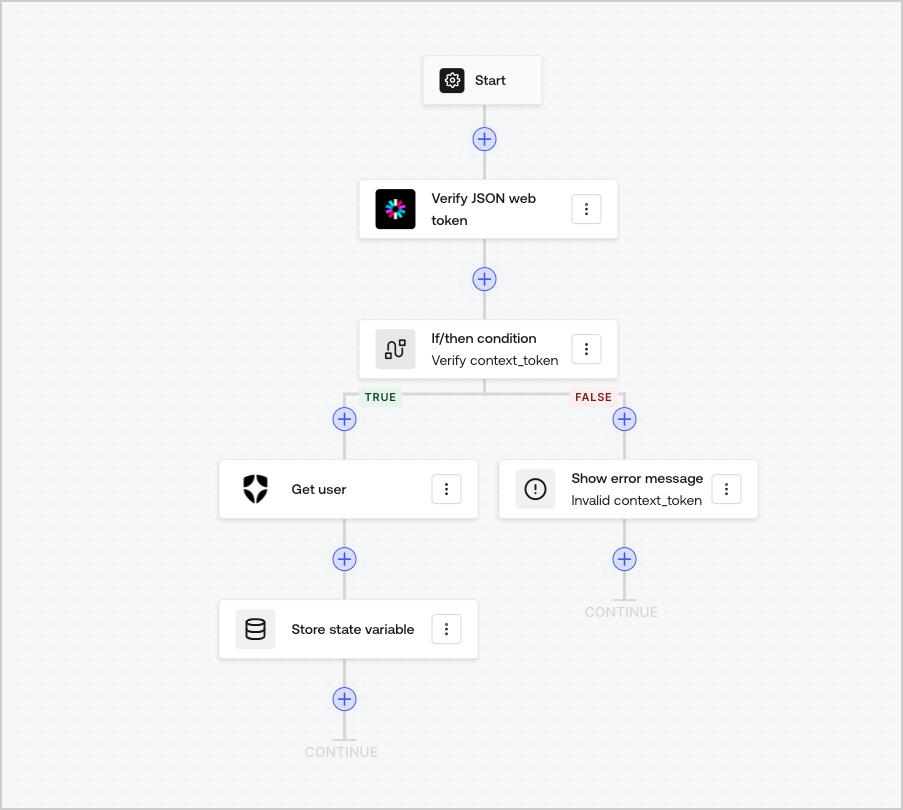
Flows allow you to visually build the server-side logic that can be executed within your Forms and handle the collected information, integrate any service with an API or trigger automations.
<Frame>
  <img src="https://mintcdn.com/docs-dev-chore-rate-limits-autoupdate/n9DrMFubcMJNYbJ7/docs/images/cdy7uua7fh8z/6u6Huh5CbH3GEQJv3AH7cx/e49ea613b2c46a43c83c89ffecddbafe/Flows.png?fit=max&auto=format&n=n9DrMFubcMJNYbJ7&q=85&s=8fec3f75eced1ebc8a94456bcaf811fe" alt="Dashboard > Forms > Flows" data-og-width="903" width="903" data-og-height="810" height="810" data-path="docs/images/cdy7uua7fh8z/6u6Huh5CbH3GEQJv3AH7cx/e49ea613b2c46a43c83c89ffecddbafe/Flows.png" data-optimize="true" data-opv="3" srcset="https://mintcdn.com/docs-dev-chore-rate-limits-autoupdate/n9DrMFubcMJNYbJ7/docs/images/cdy7uua7fh8z/6u6Huh5CbH3GEQJv3AH7cx/e49ea613b2c46a43c83c89ffecddbafe/Flows.png?w=280&fit=max&auto=format&n=n9DrMFubcMJNYbJ7&q=85&s=d3d41d8d54bee9e67616d14bef3440d1 280w, https://mintcdn.com/docs-dev-chore-rate-limits-autoupdate/n9DrMFubcMJNYbJ7/docs/images/cdy7uua7fh8z/6u6Huh5CbH3GEQJv3AH7cx/e49ea613b2c46a43c83c89ffecddbafe/Flows.png?w=560&fit=max&auto=format&n=n9DrMFubcMJNYbJ7&q=85&s=0efe3c3b700504ac78765f44c257abc2 560w, https://mintcdn.com/docs-dev-chore-rate-limits-autoupdate/n9DrMFubcMJNYbJ7/docs/images/cdy7uua7fh8z/6u6Huh5CbH3GEQJv3AH7cx/e49ea613b2c46a43c83c89ffecddbafe/Flows.png?w=840&fit=max&auto=format&n=n9DrMFubcMJNYbJ7&q=85&s=d97f6fe1b63a2f26c9ecce6642666172 840w, https://mintcdn.com/docs-dev-chore-rate-limits-autoupdate/n9DrMFubcMJNYbJ7/docs/images/cdy7uua7fh8z/6u6Huh5CbH3GEQJv3AH7cx/e49ea613b2c46a43c83c89ffecddbafe/Flows.png?w=1100&fit=max&auto=format&n=n9DrMFubcMJNYbJ7&q=85&s=a3f788beaf909f717ee5ee36065c44db 1100w, https://mintcdn.com/docs-dev-chore-rate-limits-autoupdate/n9DrMFubcMJNYbJ7/docs/images/cdy7uua7fh8z/6u6Huh5CbH3GEQJv3AH7cx/e49ea613b2c46a43c83c89ffecddbafe/Flows.png?w=1650&fit=max&auto=format&n=n9DrMFubcMJNYbJ7&q=85&s=14d5ad837ff62f2778abf4744e4a9b7f 1650w, https://mintcdn.com/docs-dev-chore-rate-limits-autoupdate/n9DrMFubcMJNYbJ7/docs/images/cdy7uua7fh8z/6u6Huh5CbH3GEQJv3AH7cx/e49ea613b2c46a43c83c89ffecddbafe/Flows.png?w=2500&fit=max&auto=format&n=n9DrMFubcMJNYbJ7&q=85&s=a8b734c9067decf6bd824199247cb4a0 2500w" />
</Frame>

You can use Flows actions with your form to:

* Create custom server-side validations for your form steps.
* Integrate with your own API making custom HTTP requests.
* Integrate with 3rd parties using our out-of-the-box integrations.
* Execute different business logic based based on user input or properties.
* Validate data using <Tooltip tip="JSON Web Token (JWT): Standard ID Token format (and often Access Token format) used to represent claims securely between two parties." cta="View Glossary" href="/docs/glossary?term=JSON+Web+Tokens">JSON Web Tokens</Tooltip>.
