> ## Documentation Index
> Fetch the complete documentation index at: https://docs-dev-chore-rate-limits-autoupdate.mintlify.site/llms.txt
> Use this file to discover all available pages before exploring further.

> Learn how to configure an update policy form using Forms for Actions for users to review and accept new terms of service or consent updates.

# Use Cases: Configure an update policy form using Forms

<Card title="Before you start">
  1. Create a [Machine-to-Machine Application](/docs/get-started/auth0-overview/create-applications/machine-to-machine-apps) with the following scopes enabled:

  * `read:users`
  * `update:users`
  * `create:users`
  * `read:users_app_metadata`
  * `update:users_app_metadata`
  * `create:users_app_metadata`

  2. Add a [Vault connection](/docs/customize/forms/vault) using the M2M application credentials.
</Card>

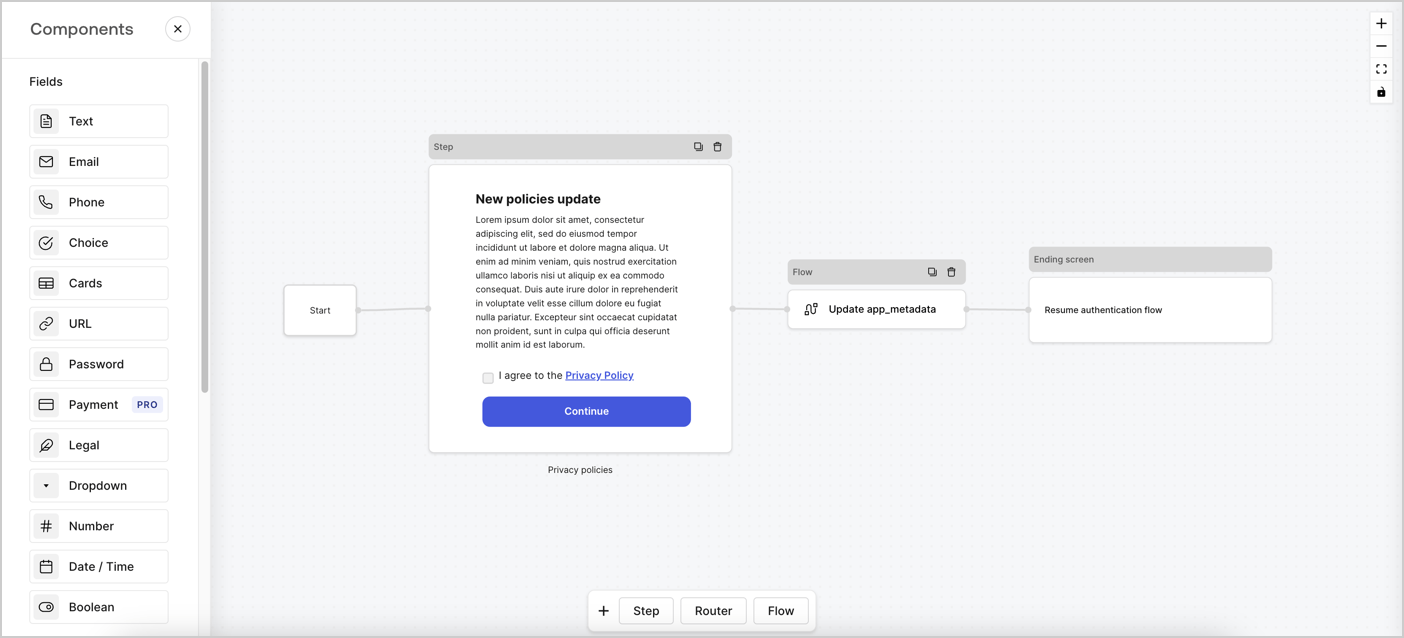
Forms for Actions allows you to create custom privacy policies flows and store the consent under the `app_metadata` object.
<Frame>
  <img src="https://mintcdn.com/docs-dev-chore-rate-limits-autoupdate/n9DrMFubcMJNYbJ7/docs/images/cdy7uua7fh8z/6i68dMvHDTijfRmSgN1x8Q/ad900e7d4c0fb34645921435472b8684/privavy-policy-form.png?fit=max&auto=format&n=n9DrMFubcMJNYbJ7&q=85&s=6014023658cd3321cc6bc9ca3518126c" alt="Dashboard > Actions > Forms > Privacy policy use case" data-og-width="1404" width="1404" data-og-height="638" height="638" data-path="docs/images/cdy7uua7fh8z/6i68dMvHDTijfRmSgN1x8Q/ad900e7d4c0fb34645921435472b8684/privavy-policy-form.png" data-optimize="true" data-opv="3" srcset="https://mintcdn.com/docs-dev-chore-rate-limits-autoupdate/n9DrMFubcMJNYbJ7/docs/images/cdy7uua7fh8z/6i68dMvHDTijfRmSgN1x8Q/ad900e7d4c0fb34645921435472b8684/privavy-policy-form.png?w=280&fit=max&auto=format&n=n9DrMFubcMJNYbJ7&q=85&s=5bd74d5d6f97296b84c023a6660dd065 280w, https://mintcdn.com/docs-dev-chore-rate-limits-autoupdate/n9DrMFubcMJNYbJ7/docs/images/cdy7uua7fh8z/6i68dMvHDTijfRmSgN1x8Q/ad900e7d4c0fb34645921435472b8684/privavy-policy-form.png?w=560&fit=max&auto=format&n=n9DrMFubcMJNYbJ7&q=85&s=5eba2fd5d2c062e8df07c1a6452b50fb 560w, https://mintcdn.com/docs-dev-chore-rate-limits-autoupdate/n9DrMFubcMJNYbJ7/docs/images/cdy7uua7fh8z/6i68dMvHDTijfRmSgN1x8Q/ad900e7d4c0fb34645921435472b8684/privavy-policy-form.png?w=840&fit=max&auto=format&n=n9DrMFubcMJNYbJ7&q=85&s=576321b0315b4ebb434cd68572599382 840w, https://mintcdn.com/docs-dev-chore-rate-limits-autoupdate/n9DrMFubcMJNYbJ7/docs/images/cdy7uua7fh8z/6i68dMvHDTijfRmSgN1x8Q/ad900e7d4c0fb34645921435472b8684/privavy-policy-form.png?w=1100&fit=max&auto=format&n=n9DrMFubcMJNYbJ7&q=85&s=e33881b309eb524d4faa1bab170fbc42 1100w, https://mintcdn.com/docs-dev-chore-rate-limits-autoupdate/n9DrMFubcMJNYbJ7/docs/images/cdy7uua7fh8z/6i68dMvHDTijfRmSgN1x8Q/ad900e7d4c0fb34645921435472b8684/privavy-policy-form.png?w=1650&fit=max&auto=format&n=n9DrMFubcMJNYbJ7&q=85&s=1064107d7b1254519e298df5cc9df456 1650w, https://mintcdn.com/docs-dev-chore-rate-limits-autoupdate/n9DrMFubcMJNYbJ7/docs/images/cdy7uua7fh8z/6i68dMvHDTijfRmSgN1x8Q/ad900e7d4c0fb34645921435472b8684/privavy-policy-form.png?w=2500&fit=max&auto=format&n=n9DrMFubcMJNYbJ7&q=85&s=c7f0f160489bff4479b20601995bffc2 2500w" />
</Frame>

The sections below outline how you can create an Update Policy form using nodes and flows, along with steps for adding your form to a [Post Login](/docs/customize/actions/explore-triggers/signup-and-login-triggers/login-trigger) Action.

## Create a form from scratch

Follow these steps to create a form to gather information:

1. Open the Form editor by selecting **Auth0 Dashboard > Actions > Forms.**
2. Select **Create Form** > **Start from scratch**.

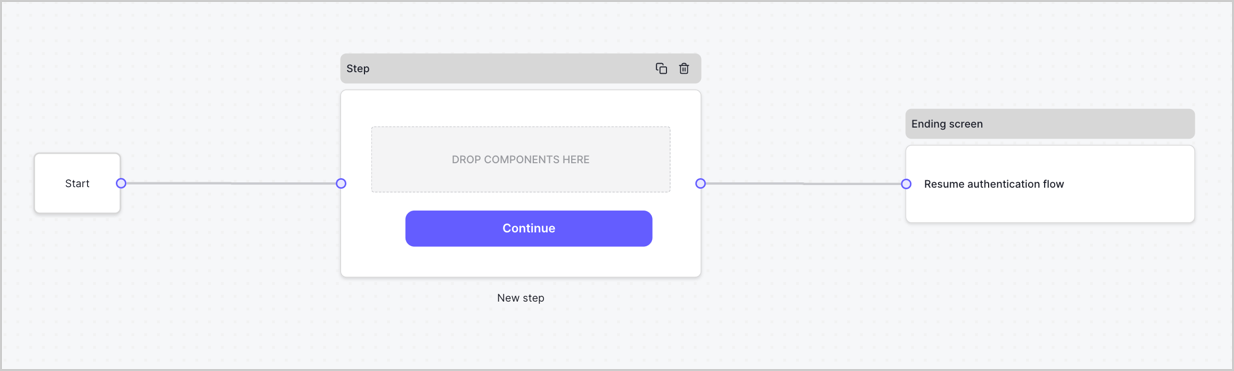
By default, a new form contains a Start node, a Step node, and an Ending screen node.
<Frame>
  <img src="https://mintcdn.com/docs-dev-chore-rate-limits-autoupdate/1dJCUNJ4t68AQZpC/docs/images/cdy7uua7fh8z/2TZ9jSjgEcARFpULI6hz4R/a4319a1bd482f2ee5cc23100fdb2f42c/New-form-Forms-for-action-use-case.png?fit=max&auto=format&n=1dJCUNJ4t68AQZpC&q=85&s=e1212c02cef939245db1d1a4b3ff2de3" alt="Dashboard > Forms > Use Cases > Form" data-og-width="1234" width="1234" data-og-height="371" height="371" data-path="docs/images/cdy7uua7fh8z/2TZ9jSjgEcARFpULI6hz4R/a4319a1bd482f2ee5cc23100fdb2f42c/New-form-Forms-for-action-use-case.png" data-optimize="true" data-opv="3" srcset="https://mintcdn.com/docs-dev-chore-rate-limits-autoupdate/1dJCUNJ4t68AQZpC/docs/images/cdy7uua7fh8z/2TZ9jSjgEcARFpULI6hz4R/a4319a1bd482f2ee5cc23100fdb2f42c/New-form-Forms-for-action-use-case.png?w=280&fit=max&auto=format&n=1dJCUNJ4t68AQZpC&q=85&s=ba300453c7bb3b0d0765ee8f046b3400 280w, https://mintcdn.com/docs-dev-chore-rate-limits-autoupdate/1dJCUNJ4t68AQZpC/docs/images/cdy7uua7fh8z/2TZ9jSjgEcARFpULI6hz4R/a4319a1bd482f2ee5cc23100fdb2f42c/New-form-Forms-for-action-use-case.png?w=560&fit=max&auto=format&n=1dJCUNJ4t68AQZpC&q=85&s=1b5f90c7caae4bf70568d00e782f1b47 560w, https://mintcdn.com/docs-dev-chore-rate-limits-autoupdate/1dJCUNJ4t68AQZpC/docs/images/cdy7uua7fh8z/2TZ9jSjgEcARFpULI6hz4R/a4319a1bd482f2ee5cc23100fdb2f42c/New-form-Forms-for-action-use-case.png?w=840&fit=max&auto=format&n=1dJCUNJ4t68AQZpC&q=85&s=059bb4cf0d4a8ad2ee86d069b9c1d29c 840w, https://mintcdn.com/docs-dev-chore-rate-limits-autoupdate/1dJCUNJ4t68AQZpC/docs/images/cdy7uua7fh8z/2TZ9jSjgEcARFpULI6hz4R/a4319a1bd482f2ee5cc23100fdb2f42c/New-form-Forms-for-action-use-case.png?w=1100&fit=max&auto=format&n=1dJCUNJ4t68AQZpC&q=85&s=848377f903a6f2ad5d9233712d6d6392 1100w, https://mintcdn.com/docs-dev-chore-rate-limits-autoupdate/1dJCUNJ4t68AQZpC/docs/images/cdy7uua7fh8z/2TZ9jSjgEcARFpULI6hz4R/a4319a1bd482f2ee5cc23100fdb2f42c/New-form-Forms-for-action-use-case.png?w=1650&fit=max&auto=format&n=1dJCUNJ4t68AQZpC&q=85&s=71da92ea5abea339a1acfeb31c620da2 1650w, https://mintcdn.com/docs-dev-chore-rate-limits-autoupdate/1dJCUNJ4t68AQZpC/docs/images/cdy7uua7fh8z/2TZ9jSjgEcARFpULI6hz4R/a4319a1bd482f2ee5cc23100fdb2f42c/New-form-Forms-for-action-use-case.png?w=2500&fit=max&auto=format&n=1dJCUNJ4t68AQZpC&q=85&s=b0072b28450c2bd1579c12bf62f8966c 2500w" />
</Frame>

### Configure the Step node

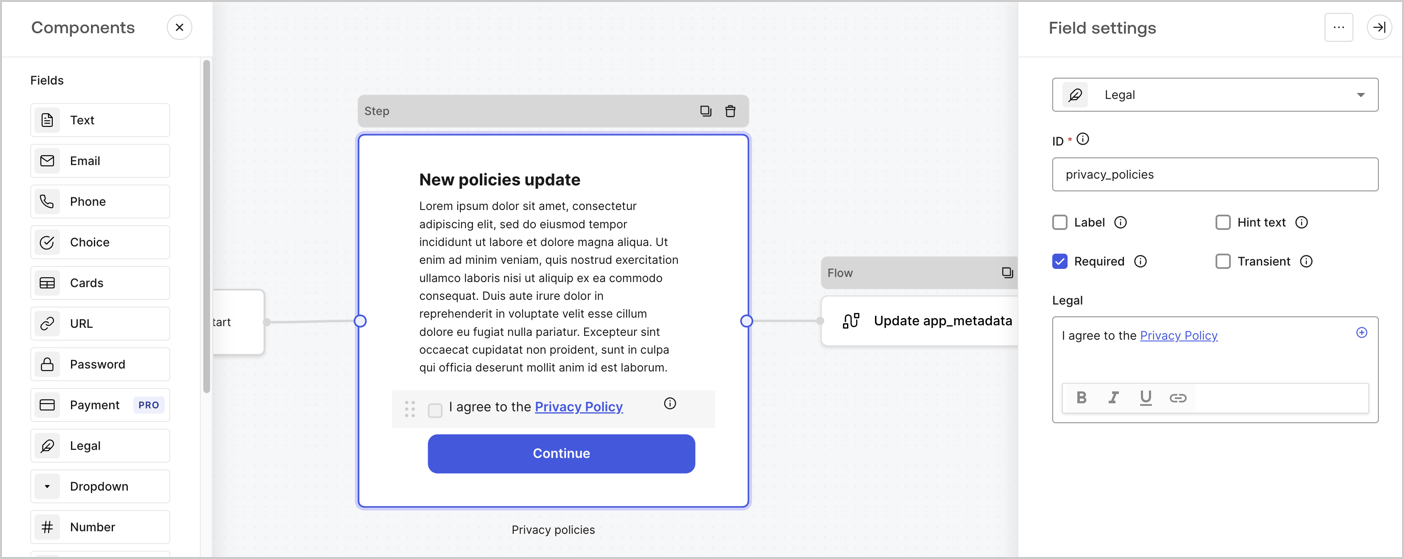
The Step node is the graphical interface visible to users. Add [Fields](/docs/customize/forms/nodes-and-components) to the Step node to collect the new agreement acceptance value by following these steps:

1. Drag a **Rich text** field from the **Components menu** into the **Step** node.

   * **Rich text**: Enter a description of your privacy policies updates.
   * Select **Save**.
2. Drag a **Legal** field into the **Step** node.

   * **ID**: Enter `privacy_policies`.
   * **Required**: Enable the checkbox.
   * **Legal**: Enter `I agree to the Privacy Policy`.
   * Select **Save**.
3. Select **Publish** to save.
<Frame>
  <img src="https://mintcdn.com/docs-dev-chore-rate-limits-autoupdate/7LyO-bj3SpfWWVhU/docs/images/cdy7uua7fh8z/59zFFjQjAnjogkc2QGIqqJ/0ad66b1b636544122aa4e65968b76c2c/privacy-policy-step-node.png?fit=max&auto=format&n=7LyO-bj3SpfWWVhU&q=85&s=e19f3f92b953022b92c86b2904af050a" alt="Dashboard > Actions > Forms > Use case privacy policy step node" data-og-width="1404" width="1404" data-og-height="559" height="559" data-path="docs/images/cdy7uua7fh8z/59zFFjQjAnjogkc2QGIqqJ/0ad66b1b636544122aa4e65968b76c2c/privacy-policy-step-node.png" data-optimize="true" data-opv="3" srcset="https://mintcdn.com/docs-dev-chore-rate-limits-autoupdate/7LyO-bj3SpfWWVhU/docs/images/cdy7uua7fh8z/59zFFjQjAnjogkc2QGIqqJ/0ad66b1b636544122aa4e65968b76c2c/privacy-policy-step-node.png?w=280&fit=max&auto=format&n=7LyO-bj3SpfWWVhU&q=85&s=4b965d86a26a898505907882a717b743 280w, https://mintcdn.com/docs-dev-chore-rate-limits-autoupdate/7LyO-bj3SpfWWVhU/docs/images/cdy7uua7fh8z/59zFFjQjAnjogkc2QGIqqJ/0ad66b1b636544122aa4e65968b76c2c/privacy-policy-step-node.png?w=560&fit=max&auto=format&n=7LyO-bj3SpfWWVhU&q=85&s=3f016d9b2fe55528a395f94e99fa1d87 560w, https://mintcdn.com/docs-dev-chore-rate-limits-autoupdate/7LyO-bj3SpfWWVhU/docs/images/cdy7uua7fh8z/59zFFjQjAnjogkc2QGIqqJ/0ad66b1b636544122aa4e65968b76c2c/privacy-policy-step-node.png?w=840&fit=max&auto=format&n=7LyO-bj3SpfWWVhU&q=85&s=2dd7dfe0e34f402b2be59f5abceea1e0 840w, https://mintcdn.com/docs-dev-chore-rate-limits-autoupdate/7LyO-bj3SpfWWVhU/docs/images/cdy7uua7fh8z/59zFFjQjAnjogkc2QGIqqJ/0ad66b1b636544122aa4e65968b76c2c/privacy-policy-step-node.png?w=1100&fit=max&auto=format&n=7LyO-bj3SpfWWVhU&q=85&s=9824381487403acb6f7999c533028667 1100w, https://mintcdn.com/docs-dev-chore-rate-limits-autoupdate/7LyO-bj3SpfWWVhU/docs/images/cdy7uua7fh8z/59zFFjQjAnjogkc2QGIqqJ/0ad66b1b636544122aa4e65968b76c2c/privacy-policy-step-node.png?w=1650&fit=max&auto=format&n=7LyO-bj3SpfWWVhU&q=85&s=ec1a9fa9872e35b37405b4f408d52c10 1650w, https://mintcdn.com/docs-dev-chore-rate-limits-autoupdate/7LyO-bj3SpfWWVhU/docs/images/cdy7uua7fh8z/59zFFjQjAnjogkc2QGIqqJ/0ad66b1b636544122aa4e65968b76c2c/privacy-policy-step-node.png?w=2500&fit=max&auto=format&n=7LyO-bj3SpfWWVhU&q=85&s=2e1b96117ca58565a9391622c0daf395 2500w" />
</Frame>

### Configure the Flow node

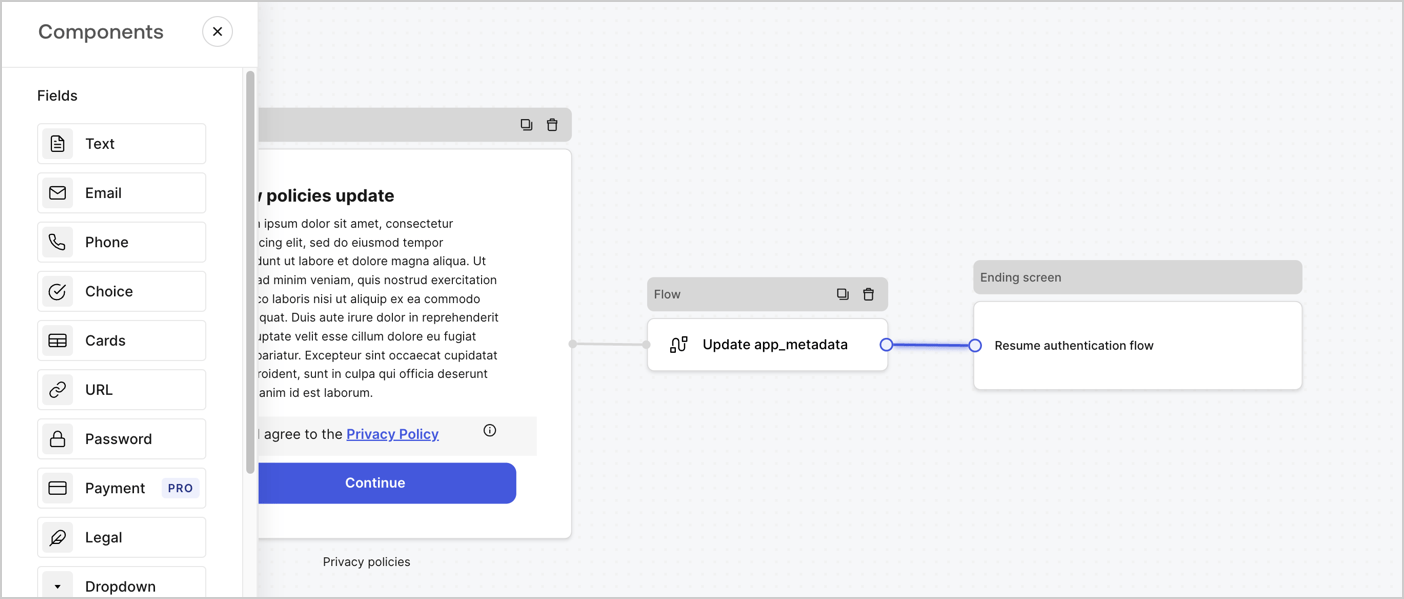
Add a **Flow** node after the **Step** node to update the `app_metadata` and resume the authentication flow by following these steps:

1. Select **Flow** from the bottom of the Form editor.
2. Remove the existing link between the **Step** and **Ending Screen** nodes.
3. Select the new **Flow** > **Click to add a flow** > **Create a new flow.**

   * Enter `Update app_metadata` in the **Name** field.
   * Select **Create**.
   * Select **Save**.
4. Link the **Flow** node to the **Step** and **Ending Screen** nodes as pictured below.
5. Select **Publish** to save.
<Frame>
  <img src="https://mintcdn.com/docs-dev-chore-rate-limits-autoupdate/n9DrMFubcMJNYbJ7/docs/images/cdy7uua7fh8z/6YIkzm7SrpM9LW76AXuRzh/353c518fe82bbaa440836da1d83596d6/link-policies.png?fit=max&auto=format&n=n9DrMFubcMJNYbJ7&q=85&s=7a22dd2cf02cac4a310560dda83926c9" alt="Dashboard > Actions > Forms > Form" data-og-width="1404" width="1404" data-og-height="599" height="599" data-path="docs/images/cdy7uua7fh8z/6YIkzm7SrpM9LW76AXuRzh/353c518fe82bbaa440836da1d83596d6/link-policies.png" data-optimize="true" data-opv="3" srcset="https://mintcdn.com/docs-dev-chore-rate-limits-autoupdate/n9DrMFubcMJNYbJ7/docs/images/cdy7uua7fh8z/6YIkzm7SrpM9LW76AXuRzh/353c518fe82bbaa440836da1d83596d6/link-policies.png?w=280&fit=max&auto=format&n=n9DrMFubcMJNYbJ7&q=85&s=ea5c8591c8385d516aadfa341ef641d5 280w, https://mintcdn.com/docs-dev-chore-rate-limits-autoupdate/n9DrMFubcMJNYbJ7/docs/images/cdy7uua7fh8z/6YIkzm7SrpM9LW76AXuRzh/353c518fe82bbaa440836da1d83596d6/link-policies.png?w=560&fit=max&auto=format&n=n9DrMFubcMJNYbJ7&q=85&s=380f690207f8223aaefc75906f330c0c 560w, https://mintcdn.com/docs-dev-chore-rate-limits-autoupdate/n9DrMFubcMJNYbJ7/docs/images/cdy7uua7fh8z/6YIkzm7SrpM9LW76AXuRzh/353c518fe82bbaa440836da1d83596d6/link-policies.png?w=840&fit=max&auto=format&n=n9DrMFubcMJNYbJ7&q=85&s=66e5a20f38328a8ba1197251b8c715a6 840w, https://mintcdn.com/docs-dev-chore-rate-limits-autoupdate/n9DrMFubcMJNYbJ7/docs/images/cdy7uua7fh8z/6YIkzm7SrpM9LW76AXuRzh/353c518fe82bbaa440836da1d83596d6/link-policies.png?w=1100&fit=max&auto=format&n=n9DrMFubcMJNYbJ7&q=85&s=45936590f281f17d692adf38678441b6 1100w, https://mintcdn.com/docs-dev-chore-rate-limits-autoupdate/n9DrMFubcMJNYbJ7/docs/images/cdy7uua7fh8z/6YIkzm7SrpM9LW76AXuRzh/353c518fe82bbaa440836da1d83596d6/link-policies.png?w=1650&fit=max&auto=format&n=n9DrMFubcMJNYbJ7&q=85&s=5d093e24a9a57c6a9d56912af39f011e 1650w, https://mintcdn.com/docs-dev-chore-rate-limits-autoupdate/n9DrMFubcMJNYbJ7/docs/images/cdy7uua7fh8z/6YIkzm7SrpM9LW76AXuRzh/353c518fe82bbaa440836da1d83596d6/link-policies.png?w=2500&fit=max&auto=format&n=n9DrMFubcMJNYbJ7&q=85&s=825ad44a9864a2d1beaa79565f8c12ec 2500w" />
</Frame>

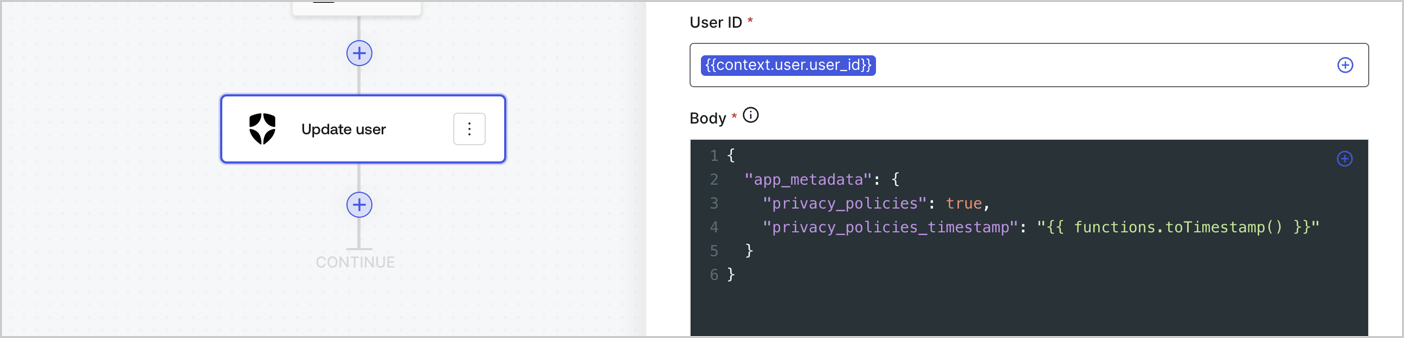
Add an Auth0 Update user action to the flow by following these steps:

1. Select the **Flow** **Update app\_metadata** > **Edit flow** to open the Flow editor in a new tab.
2. Below the StartAction, select the **+** icon to add an **Update user** action. Complete the fields below, then select **Save** to continue.

   * **Connection**: Select from the dropdown the Vault connection to your M2M application.

   * **User ID**: Enter `{{context.user.user_id}}`.

   * **Body**: Copy and paste the following code to update the app\_metadata with the privacy\_policies and privacy\_policies\_timestamp properties.

     ```text lines theme={null}
     {
       "app_metadata": {
         "privacy_policies": true,
         "privacy_policies_timestamp": "{{ functions.toTimestamp() }}"
       }
     }
     ```

   * Select **Save**.
3. Select **Publish** to save.
<Frame>
  <img src="https://mintcdn.com/docs-dev-chore-rate-limits-autoupdate/mwLIsETlzu01q2i_/docs/images/cdy7uua7fh8z/CvMNIwWrOUwaFW4X3G28p/1fb70ae57a20749d9ffaaba8dc0b7e26/update-user-privacy.png?fit=max&auto=format&n=mwLIsETlzu01q2i_&q=85&s=534c0d61f4871d1b435b7a222c98d688" alt="Dashboard > Actions > Forms > User case privacy policy code" data-og-width="1404" width="1404" data-og-height="338" height="338" data-path="docs/images/cdy7uua7fh8z/CvMNIwWrOUwaFW4X3G28p/1fb70ae57a20749d9ffaaba8dc0b7e26/update-user-privacy.png" data-optimize="true" data-opv="3" srcset="https://mintcdn.com/docs-dev-chore-rate-limits-autoupdate/mwLIsETlzu01q2i_/docs/images/cdy7uua7fh8z/CvMNIwWrOUwaFW4X3G28p/1fb70ae57a20749d9ffaaba8dc0b7e26/update-user-privacy.png?w=280&fit=max&auto=format&n=mwLIsETlzu01q2i_&q=85&s=6f5af229c1bc6f0aeb37261c49f91342 280w, https://mintcdn.com/docs-dev-chore-rate-limits-autoupdate/mwLIsETlzu01q2i_/docs/images/cdy7uua7fh8z/CvMNIwWrOUwaFW4X3G28p/1fb70ae57a20749d9ffaaba8dc0b7e26/update-user-privacy.png?w=560&fit=max&auto=format&n=mwLIsETlzu01q2i_&q=85&s=9483ba725748e854cc4ec2533694f9b1 560w, https://mintcdn.com/docs-dev-chore-rate-limits-autoupdate/mwLIsETlzu01q2i_/docs/images/cdy7uua7fh8z/CvMNIwWrOUwaFW4X3G28p/1fb70ae57a20749d9ffaaba8dc0b7e26/update-user-privacy.png?w=840&fit=max&auto=format&n=mwLIsETlzu01q2i_&q=85&s=540a674896412cdf5de870e58b576c59 840w, https://mintcdn.com/docs-dev-chore-rate-limits-autoupdate/mwLIsETlzu01q2i_/docs/images/cdy7uua7fh8z/CvMNIwWrOUwaFW4X3G28p/1fb70ae57a20749d9ffaaba8dc0b7e26/update-user-privacy.png?w=1100&fit=max&auto=format&n=mwLIsETlzu01q2i_&q=85&s=7c834dee1ca62d83e9ef60366de43bbd 1100w, https://mintcdn.com/docs-dev-chore-rate-limits-autoupdate/mwLIsETlzu01q2i_/docs/images/cdy7uua7fh8z/CvMNIwWrOUwaFW4X3G28p/1fb70ae57a20749d9ffaaba8dc0b7e26/update-user-privacy.png?w=1650&fit=max&auto=format&n=mwLIsETlzu01q2i_&q=85&s=c413d981f56274d99b4a7cd179f0e66a 1650w, https://mintcdn.com/docs-dev-chore-rate-limits-autoupdate/mwLIsETlzu01q2i_/docs/images/cdy7uua7fh8z/CvMNIwWrOUwaFW4X3G28p/1fb70ae57a20749d9ffaaba8dc0b7e26/update-user-privacy.png?w=2500&fit=max&auto=format&n=mwLIsETlzu01q2i_&q=85&s=a93fdb2b7ac1f72525f82a11c14055c8 2500w" />
</Frame>

<Callout icon="file-lines" color="#0EA5E9" iconType="regular">
  The flow **Update app\_metadata** adds a `privacy_policies true` value to the app`_metadata` object and also generates a timestamp with a [helper function.](/docs/customize/forms/variables)
</Callout>

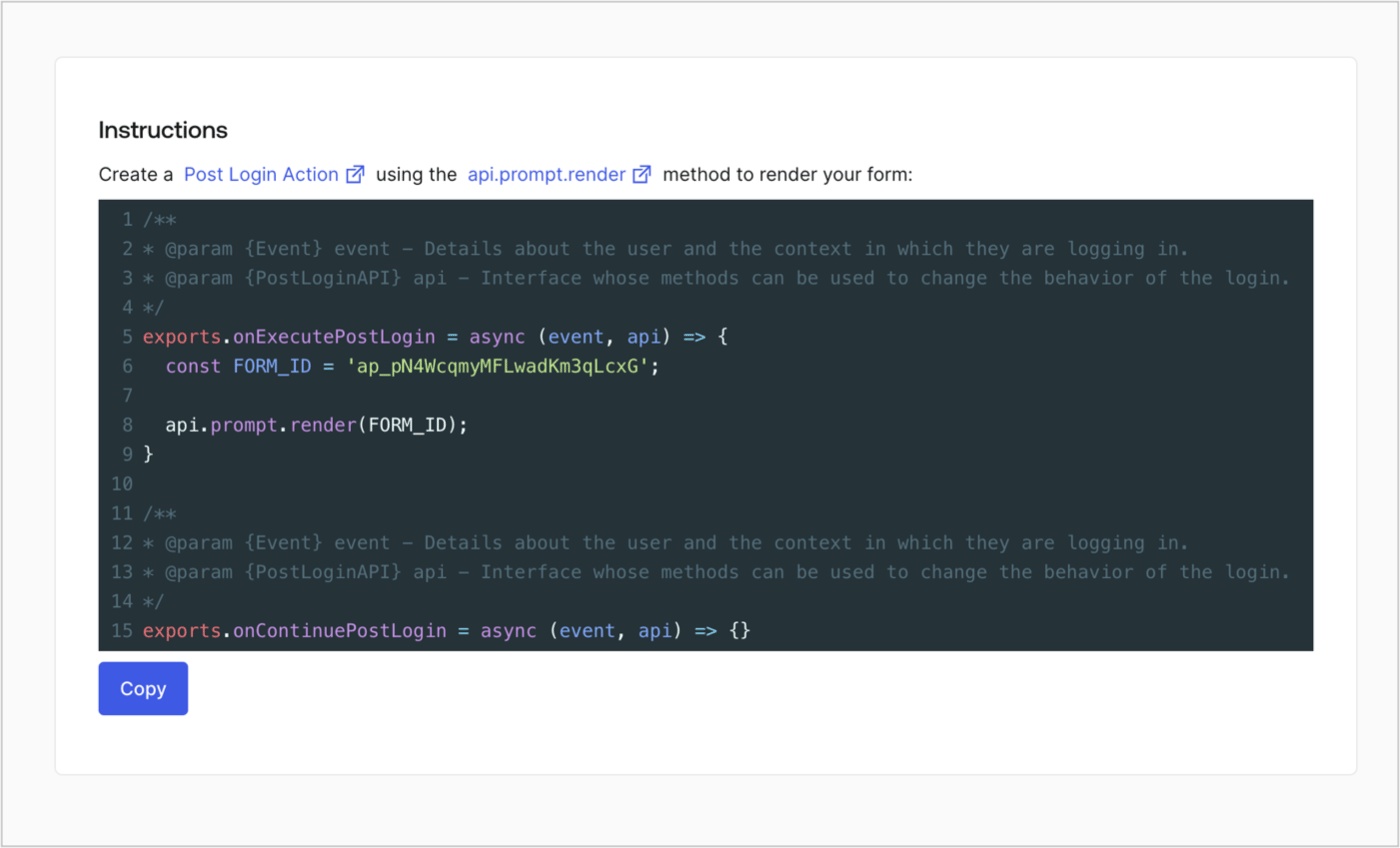
## Retrieve the form render code

Retrieve your form render code to visually render the form with a custom Post Login Action by following these steps:

* From the Form editor, select **`<> Render`**.
* Select **Copy**.
<Frame>
  <img src="https://mintcdn.com/docs-dev-chore-rate-limits-autoupdate/Xd_ZjOhmZVkCYP_o/docs/images/cdy7uua7fh8z/2EIUzc539sq9lwoTKbjoJv/496a864c0fc44a782c9cadca119dbfb0/embed.png?fit=max&auto=format&n=Xd_ZjOhmZVkCYP_o&q=85&s=562744b723acc0fd648347add02796be" alt="Dashboard > Actions > Forms > Form > Embed" data-og-width="1400" width="1400" data-og-height="848" height="848" data-path="docs/images/cdy7uua7fh8z/2EIUzc539sq9lwoTKbjoJv/496a864c0fc44a782c9cadca119dbfb0/embed.png" data-optimize="true" data-opv="3" srcset="https://mintcdn.com/docs-dev-chore-rate-limits-autoupdate/Xd_ZjOhmZVkCYP_o/docs/images/cdy7uua7fh8z/2EIUzc539sq9lwoTKbjoJv/496a864c0fc44a782c9cadca119dbfb0/embed.png?w=280&fit=max&auto=format&n=Xd_ZjOhmZVkCYP_o&q=85&s=0da3d18ef91f47074d416ee9b0b3b20b 280w, https://mintcdn.com/docs-dev-chore-rate-limits-autoupdate/Xd_ZjOhmZVkCYP_o/docs/images/cdy7uua7fh8z/2EIUzc539sq9lwoTKbjoJv/496a864c0fc44a782c9cadca119dbfb0/embed.png?w=560&fit=max&auto=format&n=Xd_ZjOhmZVkCYP_o&q=85&s=f1bccff08815d6350423c77cb8f1deb3 560w, https://mintcdn.com/docs-dev-chore-rate-limits-autoupdate/Xd_ZjOhmZVkCYP_o/docs/images/cdy7uua7fh8z/2EIUzc539sq9lwoTKbjoJv/496a864c0fc44a782c9cadca119dbfb0/embed.png?w=840&fit=max&auto=format&n=Xd_ZjOhmZVkCYP_o&q=85&s=db34acba3bb68e6445d283a6636fa20b 840w, https://mintcdn.com/docs-dev-chore-rate-limits-autoupdate/Xd_ZjOhmZVkCYP_o/docs/images/cdy7uua7fh8z/2EIUzc539sq9lwoTKbjoJv/496a864c0fc44a782c9cadca119dbfb0/embed.png?w=1100&fit=max&auto=format&n=Xd_ZjOhmZVkCYP_o&q=85&s=3e4bb76a4a366b11c549b347ed61e459 1100w, https://mintcdn.com/docs-dev-chore-rate-limits-autoupdate/Xd_ZjOhmZVkCYP_o/docs/images/cdy7uua7fh8z/2EIUzc539sq9lwoTKbjoJv/496a864c0fc44a782c9cadca119dbfb0/embed.png?w=1650&fit=max&auto=format&n=Xd_ZjOhmZVkCYP_o&q=85&s=c4bfa660ee6dc184691e8a60f38b88ba 1650w, https://mintcdn.com/docs-dev-chore-rate-limits-autoupdate/Xd_ZjOhmZVkCYP_o/docs/images/cdy7uua7fh8z/2EIUzc539sq9lwoTKbjoJv/496a864c0fc44a782c9cadca119dbfb0/embed.png?w=2500&fit=max&auto=format&n=Xd_ZjOhmZVkCYP_o&q=85&s=cde519fc96b1bc24b97122f99eb772c3 2500w" />
</Frame>

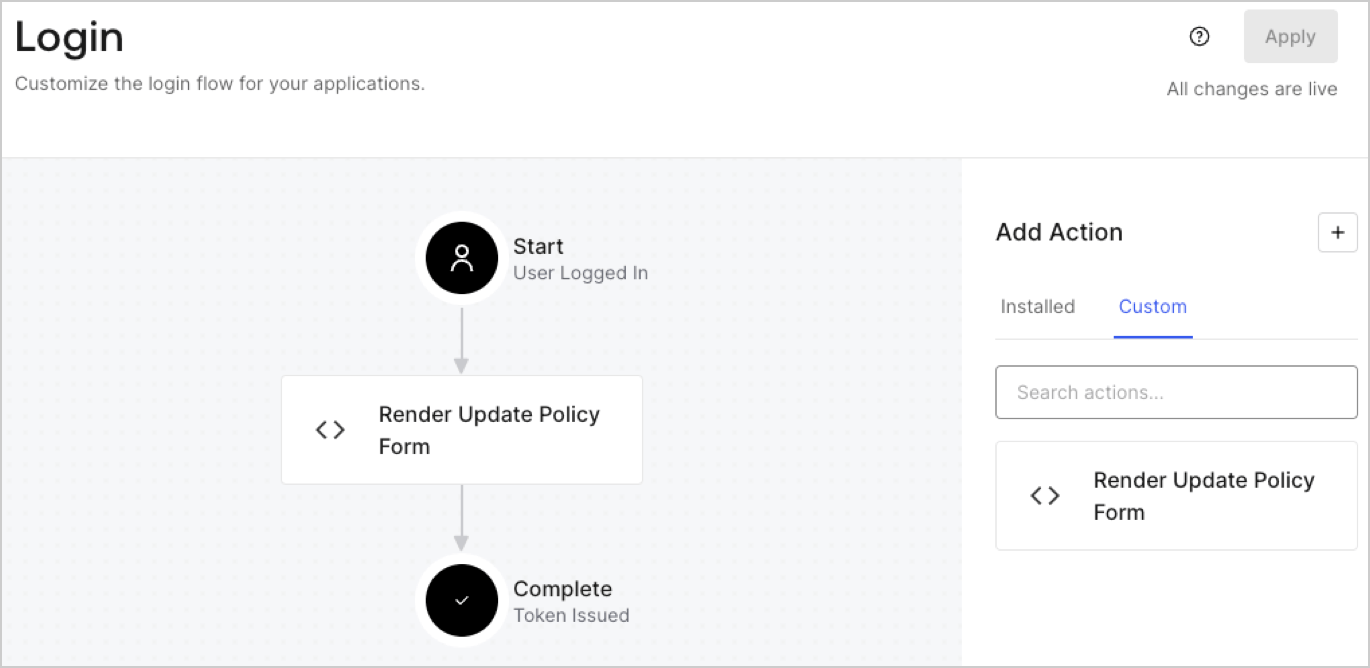
## Create a Post Login Action

Create a post-login Action to render your form by following these steps:

1. Navigate to **Auth0 Dashboard > Actions > Flows > Login.**
2. Select the **+** icon and Select **Build from scratch**:

   * **Name**: Enter `Render Update Policy Form`.
   * **Trigger**: Select `Login / Post Login`.
   * **Runtime**: Select the recommended version.
3. Select **Create**.

To configure the post-login Action:

1. Delete the existing code from the Code editor.
2. Paste the form render code into the Code editor.
3. Edit the code to define the conditional logic that will render the form.

   ```javascript lines theme={null}
   /**
   * @param {Event} event - Details about the user and the context in which they are logging in.
   * @param {PostLoginAPI} api - Interface whose methods can be used to change the behavior of the login.
   */
   exports.onExecutePostLogin = async (event, api) => {
     const FORM_ID = 'REPLACE_WITH_YOUR_FORM_ID';

     if (event.user.app_metadata.privacy_policies !== true) {
       api.prompt.render(FORM_ID);
     }
   }

   exports.onContinuePostLogin = async (event, api) => { }
   ```

   <Callout icon="file-lines" color="#0EA5E9" iconType="regular">
     The example code above will render the form when a user is missing the app metadata `privacy_policies` property.
   </Callout>
4. Select **Deploy.**
5. Drag and Drop the **Render Update Policy Form** Action to the **Login** flow.
   <Frame>
     <img src="https://mintcdn.com/docs-dev-chore-rate-limits-autoupdate/yNUDgTv1OuG0yM2C/docs/images/cdy7uua7fh8z/5TOwDgevZsBqd7yZynUYWU/41ca909dc3007aed4f40ff794a05efa5/postlogin.png?fit=max&auto=format&n=yNUDgTv1OuG0yM2C&q=85&s=a57b6e6ade1e21299454c3a0ead42d45" alt="Dashboard > Forms > Use Case > Render update policy form login action" data-og-width="1370" width="1370" data-og-height="668" height="668" data-path="docs/images/cdy7uua7fh8z/5TOwDgevZsBqd7yZynUYWU/41ca909dc3007aed4f40ff794a05efa5/postlogin.png" data-optimize="true" data-opv="3" srcset="https://mintcdn.com/docs-dev-chore-rate-limits-autoupdate/yNUDgTv1OuG0yM2C/docs/images/cdy7uua7fh8z/5TOwDgevZsBqd7yZynUYWU/41ca909dc3007aed4f40ff794a05efa5/postlogin.png?w=280&fit=max&auto=format&n=yNUDgTv1OuG0yM2C&q=85&s=5356c04b5d62863f8347d3787e44b8c4 280w, https://mintcdn.com/docs-dev-chore-rate-limits-autoupdate/yNUDgTv1OuG0yM2C/docs/images/cdy7uua7fh8z/5TOwDgevZsBqd7yZynUYWU/41ca909dc3007aed4f40ff794a05efa5/postlogin.png?w=560&fit=max&auto=format&n=yNUDgTv1OuG0yM2C&q=85&s=57e5a8adc8438d102dc17249e8dbee45 560w, https://mintcdn.com/docs-dev-chore-rate-limits-autoupdate/yNUDgTv1OuG0yM2C/docs/images/cdy7uua7fh8z/5TOwDgevZsBqd7yZynUYWU/41ca909dc3007aed4f40ff794a05efa5/postlogin.png?w=840&fit=max&auto=format&n=yNUDgTv1OuG0yM2C&q=85&s=703c3e39e49dca3f3c2717e582b16c4b 840w, https://mintcdn.com/docs-dev-chore-rate-limits-autoupdate/yNUDgTv1OuG0yM2C/docs/images/cdy7uua7fh8z/5TOwDgevZsBqd7yZynUYWU/41ca909dc3007aed4f40ff794a05efa5/postlogin.png?w=1100&fit=max&auto=format&n=yNUDgTv1OuG0yM2C&q=85&s=b6cdaa3e6e95fcac19a2ff2725cc5cbb 1100w, https://mintcdn.com/docs-dev-chore-rate-limits-autoupdate/yNUDgTv1OuG0yM2C/docs/images/cdy7uua7fh8z/5TOwDgevZsBqd7yZynUYWU/41ca909dc3007aed4f40ff794a05efa5/postlogin.png?w=1650&fit=max&auto=format&n=yNUDgTv1OuG0yM2C&q=85&s=117dca7a022f5470ccaa1d4bb5e2515f 1650w, https://mintcdn.com/docs-dev-chore-rate-limits-autoupdate/yNUDgTv1OuG0yM2C/docs/images/cdy7uua7fh8z/5TOwDgevZsBqd7yZynUYWU/41ca909dc3007aed4f40ff794a05efa5/postlogin.png?w=2500&fit=max&auto=format&n=yNUDgTv1OuG0yM2C&q=85&s=06db69740caa433b3a8f6f0f2fe899e0 2500w" />
   </Frame>
6. Select **Apply.**

### Test implementation

Test the implementation by following these steps:

1. Log in with an existing user whose app`_metadata` attribute `privacy_policies` does not have a value.
2. The post-login Action in the Login flow will render the form and prompt for acceptance.
3. Select **Auth0 Dashboard > User Management > Users,** locate the user and verify that the `app_metadata` attribute `privacy_policies` contains a `true` value and a timestamp.
